Ragas 评估指南
以下是Ragas-LLM-app的简单介绍,内容主要介绍使用 Ragas 评估简单 LLM 应用,RAG,综合流程的处理方法,以及Ragas 的评估方法。
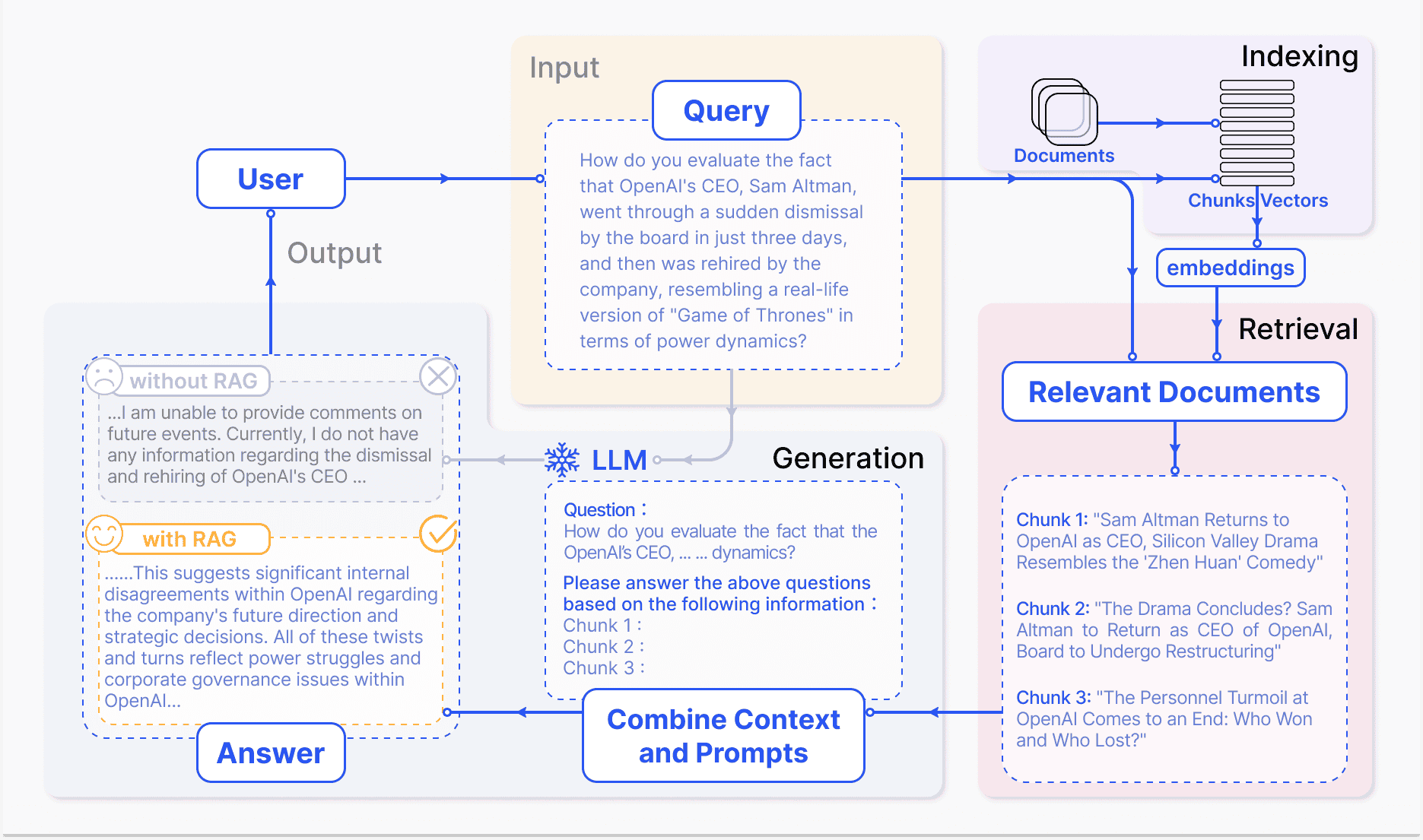
Ragas 是什么
Ragas 是一个用于评估 LLM 应用的工具,支持多种指标,包括非 LLM 指标和基于 LLM 的指标。 Ragas 框架定义了四个核心评估指标 ——context_relevancy(上下文相关性)、context_recall(上下文回溯)、faithfulness(忠实度)和 answer_relevancy(答案相关性)—— 这四个指标共同构成了 Ragas 评分体系。Ragas 本身使用的有多个标准:
无参考评测:RAGAs 最初设计为一种 “无参考” 评测框架,意味着它不依赖于人工注释的真实标签,而是利用大型语言模型(LLM)进行评测。 组件级评测:RAGAs 允许对 RAG 管道的两个主要组件 —— 检索器和生成器 —— 分别进行评测。这种分离评测方法有助于精确地识别管道中的性能瓶颈。
综合性评测指标:RAGAs 提供了一系列评测指标,包括上下文精度 (Context Precision)、上下文召回 (Context Recall)、忠实度 (Faithfulness) 和答案相关性 (Answer Relevancy)。这些指标共同构成了 RAGAs 评分,用于全面评测 RAG 管道的性能。
简历一个 RAG 其实并不复杂,但是如果要将其应用到生产环境中,你不得不面对非常多的挑战,不同组件之间生成的数据是否能够满足自己的需求?数据的质量是否达标等等,这些问题都是需要我们考虑的,而 Ragas 就是帮助我们解决这些问题的工具。
目前学术界和工业界对于 RAG 的评估并没有一个统一的标准,传统的指标如:ROUGE、BLEU 、ARES等,这些指标在评估 RAG 时稍显落后,于是乎 Ragas 诞生了。
Ragas 使用逻辑
RAGAs 是一个用于评测检索增强生成(RAG)应用的评测框架,它的核心目标是提供一套综合性的评测指标和方法,以量化地评测 RAG 管道 (RAG Pipeline) 在不同组件层面上的性能。RAGAs 特别适用于那些结合了检索(Retrieval)和生成(Generation)两个主要组件的 RAG 系统,支持 Langchain 和 Llama-Index。
- 评测流程
- 开始:启动准备和设置 RAG 应用的过程。
- 数据准备:加载和分块处理文档。
- 设置向量数据库:生成向量嵌入并存储在向量数据库中。
- 设置检索器组件:基于向量数据库设置检索器。
- 组合 RAG 管道:结合检索器、提示模板和 LLM 组成 RAG 管道。
- 准备评测数据:准备问题和对应的真实答案。
- 构建数据集:通过推理准备数据并构建用于评测的数据集。
- 评测 RAG 应用:导入评测指标并对 RAG 应用进行评测。
- 结束:完成评测过程。
评估方法
- 非 LLM 指标:使用 BleuScore 评分
 1from ragas import SingleTurnSample
 2from ragas.metrics import BleuScore
 3
 4test_data = {
 5    "user_input": "summarise given text\nThe company reported an 8% rise in Q3 2024, driven by strong performance in the Asian market. Sales in this region have significantly contributed to the overall growth. Analysts attribute this success to strategic marketing and product localization. The positive trend in the Asian market is expected to continue into the next quarter.",
 6    "response": "The company experienced an 8% increase in Q3 2024, largely due to effective marketing strategies and product adaptation, with expectations of continued growth in the coming quarter.",
 7    "reference": "The company reported an 8% growth in Q3 2024, primarily driven by strong sales in the Asian market, attributed to strategic marketing and localized products, with continued growth anticipated in the next quarter."
 8}
 9metric = BleuScore()
10test_data = SingleTurnSample(**test_data)
11metric.single_turn_score(test_data)
测试样本包含 用户输入、响应(来自 LLM 的输出)和 参考(来自 LLM 的预期输出),作为评估摘要的数据点。输出为一个得分:
0.137
- 缺点:
- 准备参考数据耗时且评分可能不准确,即使 response 和 reference 相似,输出的分数也很低
- 需要准备参考数据,如果数据量很大,这个过程会非常耗时。
- 优点:
- 快速评估,不需要复杂的配置。
- 基于 LLM 的指标:使用 AspectCritic 等,输出通过/失败结果(如 1 表示通过,0 表示失败),支持模型包括 GPT-4o、Claude、Gemini 和 Azure。
第一步:安装 langchain-openai
1pip install langchain-openai
确保你已经准备好 OpenAI 密钥并可用
1import os
2os.environ["OPENAI_API_KEY"] = "your-openai-key"
将你的 LLMs 包装在 LangchainLLMWrapper 中,以便与 ragas 一起使用
1from ragas.llms import LangchainLLMWrapper
2from ragas.embeddings import LangchainEmbeddingsWrapper
3from langchain_openai import ChatOpenAI
4from langchain_openai import OpenAIEmbeddings
5evaluator_llm = LangchainLLMWrapper(ChatOpenAI(model="gpt-4o"))
6evaluator_embeddings = LangchainEmbeddingsWrapper(OpenAIEmbeddings())
评估指标:这里我们将使用 AspectCritic,这是一个基于 LLM 的指标,输出通过/失败结果。
 1from ragas import SingleTurnSample
 2from ragas.metrics import AspectCritic
 3
 4test_data = {
 5    "user_input": "summarise given text\nThe company reported an 8% rise in Q3 2024, driven by strong performance in the Asian market. Sales in this region have significantly contributed to the overall growth. Analysts attribute this success to strategic marketing and product localization. The positive trend in the Asian market is expected to continue into the next quarter.",
 6    "response": "The company experienced an 8% increase in Q3 2024, largely due to effective marketing strategies and product adaptation, with expectations of continued growth in the coming quarter.",
 7}
 8
 9metric = AspectCritic(name="summary_accuracy",llm=evaluator_llm, definition="Verify if the summary is accurate.")
10test_data = SingleTurnSample(**test_data)
11await metric.single_turn_ascore(test_data)
输出:成功通过,输出 1 表示通过,0 表示失败
1
数据集与结果
Ragas 支持从 Hugging Face 加载数据集,如 “explodinggradients/earning_report_summary”,包含 50 个样本,特征包括 user_input 和 response,生成的结果可导出到 pandas 分析,或通过 app.ragas.io 进行交互式分析。
意外细节
除了常见指标,内容还提到可以通过注释 15-20 个样本并训练自定义指标来改进评估,涉及上传到 app.ragas.io 并使用 Ragas APP token,这可能是用户未预料到的额外步骤。
详细报告
如果使用 Ragas 的数据集评测,则数据集格式至少包含 user_input 和 response 字段,如下所示:
 1[
 2    # Sample 1
 3    {
 4        "user_input": "summarise given text\nThe Q2 earnings report revealed a significant 15% increase in revenue, ...",
 5        "response": "The Q2 earnings report showed a 15% revenue increase, ...",
 6    },
 7    # Additional samples in the dataset
 8    ....,
 9    # Sample N
10    {
11        "user_input": "summarise given text\nIn 2023, North American sales experienced a 5% decline, ...",
12        "response": "Companies are strategizing to adapt to market challenges and ...",
13    }
14]
然后通过以下方法进行使用:
 1from datasets import load_dataset
 2from ragas import EvaluationDataset
 3eval_dataset = load_dataset("explodinggradients/earning_report_summary",split="train")
 4eval_dataset = EvaluationDataset.from_hf_dataset(eval_dataset)
 5print("Features in dataset:", eval_dataset.features())
 6print("Total samples in dataset:", len(eval_dataset))
 7
 8# 输出
 9# Features in dataset: ['user_input', 'response']
10# Total samples in dataset: 50
11
12from ragas import evaluate
13
14results = evaluate(eval_dataset, metrics=[metric])
15results
16
17# 输出
18# {'summary_accuracy': 0.84}
再将结果导出到 pandas 进行分析:
1results.to_pandas()
# 输出
#   user_input response  summary_accuracy
# 0  summarise given text\nThe Q2 earnings report revealed a significant 15% increase in revenue, ...  The Q2 earnings report showed a 15% revenue increase, ...  0.84
# 1  summarise given text\nIn 2023, North American sales experienced a 5% decline, ...  Companies are strategizing to adapt to market challenges and ...  0.84
一个例子如下:

当然 app.ragas.io 也提供了交互式分析,可以查看每个指标的详细结果,你首先要注册一个账号,然后生成一个 Ragas APP token,然后就可以上传结果查看仪表板。
Ragas中的RAG 评估
完整示例
 1import os
 2from langchain_openai import ChatOpenAI
 3from ragas import SingleTurnSample, EvaluationDataset, evaluate
 4from ragas.metrics import BleuScore, AspectCritic
 5from ragas.llms import LangchainLLMWrapper
 6import pandas as pd
 7
 8# 设置环境和 LLM
 9os.environ["OPENAI_API_KEY"] = "your-openai-key"
10llm = ChatOpenAI(model="gpt-4o", temperature=0)
11
12# 定义 RAG 管道(简化为文本摘要)
13def summarize_text(input_text):
14    return llm.invoke(f"Summarize the following text:\n\n{input_text}").content
15
16# 准备数据集并生成 response
17dataset = [
18    {"user_input": "summarise given text\nThe company reported a 12% revenue increase in Q1 2025, driven by strong demand in Europe. New product launches contributed significantly to this growth. Analysts expect this trend to persist into Q2.", "reference": "The company’s revenue grew 12% in Q1 2025, fueled by strong European sales and new product releases, with analysts predicting sustained growth."},
19    {"user_input": "summarise given text\nIn Q4 2024, sales dropped by 5% due to supply chain issues in North America. Efforts to resolve these disruptions are underway, but recovery is slow.", "reference": "Q4 2024 saw a 5% sales decline in North America from supply chain disruptions, with ongoing but slow recovery attempts."},
20    {"user_input": "summarise given text\nThe firm achieved a 20% profit hike in 2024, thanks to cost-cutting measures and expansion into Asian markets. However, challenges remain in regulatory compliance.", "reference": "In 2024, the firm’s profits increased 20% from cost cuts and Asian expansion, though regulatory issues persist."}
21]
22for sample in dataset:
23    sample["response"] = summarize_text(sample["user_input"])
24
25# 配置 Ragas 指标
26bleu_metric = BleuScore()
27aspect_metric = AspectCritic(name="summary_accuracy", llm=LangchainLLMWrapper(llm), definition="Verify if the summary is accurate.")
28
29# 转换为 Ragas 数据集并评估
30eval_dataset = EvaluationDataset(samples=[SingleTurnSample(**s) for s in dataset])
31results = evaluate(eval_dataset, metrics=[bleu_metric, aspect_metric])
32
33# 输出结果并转换为 pandas
34print(f"Evaluation Results: {results}")
35df = results.to_pandas()
36print("\nDetailed Results:\n", df[["user_input", "response", "bleu_score", "summary_accuracy"]].to_string(index=False))
37
38# 可选:上传到 app.ragas.io(需 token)
39# results.upload(token="your-ragas-app-token")
关于一个完整的RAG 应用
下面是一个完整的RAG 应用,包括数据集的加载、评估指标的配置、评估结果的保存等,可以在 Ragas中找到相关的 API 文档,包含了完整的评估流程。
 1import os
 2from datasets import load_dataset
 3from ragas import evaluate
 4from ragas.metrics import (
 5    faithfulness, answer_relevancy, context_precision, context_recall
 6)
 7from langchain_openai import ChatOpenAI, OpenAIEmbeddings
 8from langchain_community.embeddings import HuggingFaceEmbeddings
 9
10# 设置 API 密钥
11os.environ["OPENAI_API_KEY"] = "your_openai_key"
12
13# 初始化 LLM 和嵌入模型
14llm = ChatOpenAI(model="gpt-4o")
15embeddings = OpenAIEmbeddings()  # 或使用 HuggingFaceEmbeddings("sentence-transformers/all-MiniLM-L6-v2")
16
17# 加载测试数据集
18dataset = load_dataset("explodinggradients/fiqa", "rag-eval-explodinggradients")["baseline"]
19print(f"Loaded {len(dataset)} samples from fiqa dataset")
20
21# 配置评估指标
22metrics = [
23    faithfulness(llm=llm),           # 答案忠实度
24    answer_relevancy(llm=llm, embeddings=embeddings),  # 答案相关性
25    context_precision(llm=llm),      # 上下文精确度
26    context_recall(llm=llm)          # 上下文召回率
27]
28
29# 执行评估
30result = evaluate(
31    dataset=dataset,
32    metrics=metrics,
33    llm=llm,
34    embeddings=embeddings,
35    raise_exceptions=True  # 显示错误以便调试
36)
37
38# 输出结果并保存
39print("Evaluation Results:", result)
40result.to_pandas().to_csv("rag_eval_results.csv", index=False)
41print("Results saved to rag_eval_results.csv")
42print(result.to_pandas().head())  # 显示前 5 个样本
代码说明
导入与配置:
- 导入必要模块,包括 Ragas 的评估工具、LangChain 的 LLM 和嵌入模型,以及 Hugging Face 数据集支持。
- 设置 OpenAI API 密钥。
模型初始化:
- 使用
gpt-4o作为评估 LLM,OpenAIEmbeddings用于嵌入(可选使用 Hugging Face 模型)。 - 这些模型驱动指标计算。
- 使用
加载数据集:
- 从 Hugging Face 加载 “explodinggradients/fiqa” 数据集的 “rag-eval-explodinggradients” 子集,包含问题、答案和上下文。
- 数据集格式已适配 Ragas(包括
question,answer,contexts,ground_truths)。
配置指标:
- 定义 4 个核心指标:忠实度(faithfulness)、答案相关性(answer_relevancy)、上下文精确度(context_precision)、上下文召回率(context_recall)。
- 每个指标绑定 LLM 和嵌入模型。
执行与保存:
- 使用
evaluate函数一次性评估所有样本和指标。
- 使用
运行后,输出类似:
1Loaded 50 samples from fiqa dataset
2Evaluation Results: {'faithfulness': 0.92, 'answer_relevancy': 0.95, 'context_precision': 0.88, 'context_recall': 0.90}
3Results saved to rag_eval_results.csv
4   question  answer  contexts  ground_truths  faithfulness  answer_relevancy  context_precision  context_recall
50  What is...  It is...  [ctx1, ctx2]  True answer...  0.95          0.98              0.90            0.92
61  How does...  It does...  [ctx3]      True answer...  0.90          0.94              0.85            0.89
7...
综合测试相关代码
 1import os
 2from ragas.testset import TestsetGenerator
 3from ragas.testset.evolutions import SimpleEvolution, MultiContextEvolution, ReasoningEvolution
 4from langchain_openai import ChatOpenAI, OpenAIEmbeddings
 5from langchain_community.document_loaders import PyPDFLoader
 6from langchain_text_splitters import RecursiveCharacterTextSplitter
 7
 8# 设置 API 密钥
 9os.environ["OPENAI_API_KEY"] = "your_openai_key"
10
11# 初始化 LLM 和嵌入模型
12generator_llm = ChatOpenAI(model="gpt-4o")
13critic_llm = ChatOpenAI(model="gpt-4o")
14embeddings = OpenAIEmbeddings()
15
16# 加载并分割文档
17loader = PyPDFLoader("https://arxiv.org/pdf/2309.15217.pdf")  # 示例使用 Ragas 论文
18documents = loader.load()
19text_splitter = RecursiveCharacterTextSplitter(chunk_size=1000, chunk_overlap=200)
20docs = text_splitter.split_documents(documents)
21print(f"Loaded {len(docs)} document chunks")
22
23# 配置测试集生成器
24generator = TestsetGenerator(
25    generator_llm=generator_llm,
26    critic_llm=critic_llm,
27    embeddings=embeddings,
28    docstore=None  # 使用默认内存存储
29)
30
31# 定义演化分布
32distributions = {
33    SimpleEvolution(): 0.5,         # 50% 简单问题
34    MultiContextEvolution(): 0.25,  # 25% 多上下文问题
35    ReasoningEvolution(): 0.25     # 25% 推理问题
36}
37
38# 生成测试集
39testset = generator.generate_with_langchain_docs(
40    documents=docs,
41    test_size=10,              # 生成 10 个测试样本
42    distributions=distributions,
43    raise_exceptions=True      # 显示错误以便调试
44)
45
46# 转换为 DataFrame 并保存
47df = testset.to_pandas()
48df.to_csv("rag_testset.csv", index=False)
49print("Testset generated and saved to rag_testset.csv")
50print(df.head())  # 显示前 5 个样本
代码说明
导入与配置:
- 导入所有必要模块,包括 Ragas 的测试集生成工具和 LangChain 的 LLM、嵌入模型及文档处理工具。
- 设置 OpenAI API 密钥。
模型初始化:
- 使用
gpt-4o作为生成器和批评者 LLM,OpenAIEmbeddings用于嵌入。 - 这些模型驱动问题生成和质量评估。
- 使用
文档加载与分割:
- 从指定 URL 加载 PDF(示例使用 Ragas 论文)。
- 使用
RecursiveCharacterTextSplitter将文档分割为大小 1000 字符、200 字符重叠的块。
测试集生成器:
- 初始化
TestsetGenerator,配置 LLM 和嵌入模型,默认使用内存文档存储。 - 定义演化分布:50% 简单问题,25% 多上下文问题,25% 推理问题。
- 初始化
生成与保存:
- 调用
generate_with_langchain_docs生成 10 个测试样本。 - 将结果转为 pandas DataFrame 并保存为 CSV 文件,同时打印前 5 行。
- 调用
输出示例
运行后,输出类似:
1Loaded 15 document chunks
2Testset generated and saved to rag_testset.csv
3   question_type  question  ground_truth  contexts  ...
40  simple        What is Ragas?  Ragas is a framework...  [doc_chunk_1, ...]
51  multi_context  How does Ragas compare...?  Ragas differs by...  [doc_chunk_2, ...]
62  reasoning     Why might Ragas be preferred...?  Due to its...  [doc_chunk_3, ...]
7...
关键引用
- Evaluate your first LLM App - Ragas
- langchain-aws Integration
- Google AI Studio Documentation
- Google Cloud Vertex AI Documentation
- LangChain Google AI Integration
- LangChain Vertex AI Integration
- langchain-azure Integration
- Ragas App Login
- Ragas App Token Generation
- Ragas GitHub Issue for LLM Support
- RAG 评测调研:框架、指标和方法 | EvalScope